
Online auction of modern high-end laboratory and biopharma research equipment from the recent bankruptcy of Spexis AG in Allschwil near Basel, Switzerland. Start bidding today! closes on June 4. info@dome-auctions.com..+31(0)20 808 2880


Our service technicians are factory trained with surgical microscopes such as: Zeiss, Leica, Moller, Topcon, Storz/Urban and many more. Call (800) 438-3937.


MPN: 090-131.002... view more
Asking Price:
$995 USD

MPN: TY-63627... view more
Asking Price:
$899 USD
Therapeutic Technologies closeout auctions take place on DOTmed.com. Bid today on 538 lots of medical equipment. Inspections may be done by appointment. Hours are Monday through Friday 9am-4pm Contact chrisnuytens1@gmail.com to schedule.

MPN: E200... view more
Asking Price:
$999 USD

MPN: AO-Microscope... view more
Asking Price:
$224 USD

MPN: HFL-2110... view more
Asking Price:
$320 USD

MPN: Fluoarc-BP-400.26A... view more
Asking Price:
$262 USD

Celebrating 32 years of servicing the ophthalmic community. Quality pre-owned equipment at discounted prices. Satisfaction guaranteed. Alcon Bausch & Lomb, AMO, Zeiss, Leica, Phaco handpiece repair & more. Se habla Espanol.

MPN: Axiovert-135... view more
Asking Price:
$498 USD

Factory sealed Mopec MOC9000 304 stainless necropsy table with integrated sink. Ideal for veterinary labs and pathology suites. Dallas TX. Call or text 972-900-4536 for pricing and details.
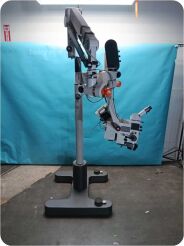
Item # 346932 Title: Leica MEL64 Surgical Microscope Quantity: 1 Item Location: Maryland Over All Condition Excellent (Please view all pictures) Cosmetics Good (Please view all... view more
Asking Price:
$11,422 USD

Condition: Used Seller Notes GENERAL DESCRIPTION -The item is in usable condition, removed from the work environment. -It has been tested and is powered on. -No further testing has been... view more
Asking Price:
$900 USD
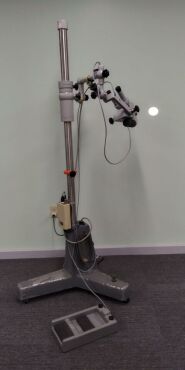
Zeiss OPMI 6-S Surgical Microscope - Please read for details! This equipment is in stock and available for purchase! The equipment is in used cosmetic condition with wear. The system... view more
Asking Price:
$2,500 USD
Microscopes are an essential tool for scientific research and education. They allow scientists to observe and analyze objects that are too small to be seen with the naked eye. Microscopes come in a variety of shapes and sizes, ranging from simple handheld models to complex lab instruments. They can be used to study bacteria, viruses, cells, and other microorganisms.
The price range for microscopes can vary greatly depending on the type and features. Basic handheld models can cost as little as $50, while more advanced models can cost several thousand dollars. Many microscope manufacturers offer a wide range of models to suit different budgets and needs. Popular microscope manufacturers include Leica, Nikon, Olympus, and Zeiss. These companies offer a variety of models, from entry-level to professional-grade. Many of these models also come with additional features such as digital imaging, advanced optics, and computer-controlled operation.


 1
1

